Herz P1 Smart Ring - Sleep Tracking Tips, Updates & Troubleshooting
This article will walk you through how to get the best sleep tracking experience with your Herz P1 Smart Ring and explain recent updates we’ve made to improve accuracy.
1. Wearing the Ring Correctly (Very Important)
Sleep tracking depends heavily on how the ring is worn.
Fit
-
The ring should feel snug but not tight.
-
It should not spin freely on your finger.
-
A loose ring can cause missing or inaccurate data.
Best Fingers to Use
-
Index finger (recommended)
-
Middle finger
-
Ring finger
Sensor Position
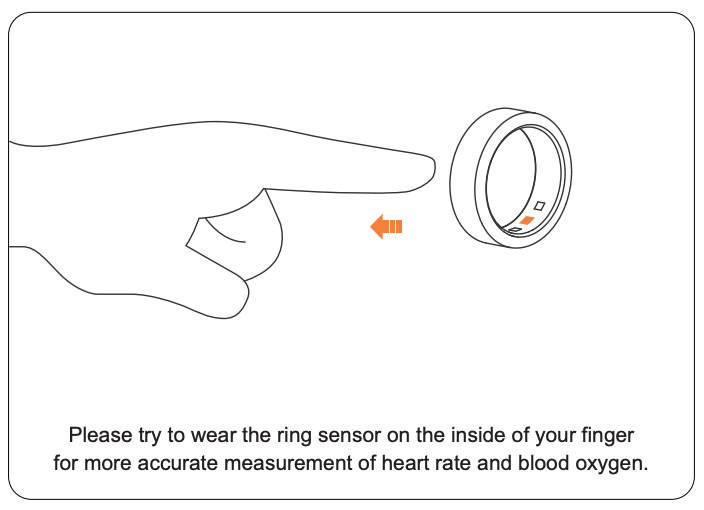
- Make sure the sensor is on the palm side (underside) of your finger.
-
This ensures proper contact with your skin.
2. Battery Check Before Sleep
-
Make sure the ring is fully charged before bedtime.
-
A low battery may cause sleep data to stop recording during the night.
If you’re troubleshooting, always start with a full charge.
3. Sleep Environment & Habits
💡Did you know? Small habits can affect tracking accuracy.
-
Try to keep a consistent sleep schedule.
-
Avoid excessive hand movement right before falling asleep.
-
Very tight fists or sleeping with hands under your body may reduce accuracy.
-
Cold fingers can affect circulation and sensor readings.
4. App, Firmware & Syncing
-
Make sure both the app and ring firmware are up to date.
-
After waking up, open the app and allow it time to sync.
-
If syncing fails:
-
Restart your phone
-
If needed, reinstall the app or you can also unbind and bind your ring from the app
5. IMPORTANT UPDATE: Sleep Tracking System Change
An OTA (over-the-air) update has been rolled out to improve sleep tracking accuracy and consistency. Please follow the in-app prompt to install the update (updated version: 1.00.04)
What’s changing?
Sleep tracking is moving from 24-hour tracking to:
-
Night Sleep Tracking
-
Nap Tracking
This system is already used by 100,000+ devices and has proven to be more stable and accurate.
💡New Sleep Tracking Windows (VERY IMPORTANT)
After the update, sleep is tracked only during these times:
Night Sleep
• 10:00 PM - 8:00 AM
Naps
• 11:30 AM - 2:30 PM
Sleep outside these hours will not be tracked. This method prioritizes accuracy over quantity and it is already used at scale and is more reliable with fewer gaps and more consistent sleep data.
If Sleep Is Missing Data During the New Sleeping Hours
If your sleep data is consistently missing during specific hours within the new sleep tracking window, even after following the steps above, this may be due to a temporary bug related to the recent app update.
Please don’t worry, our developers are actively working to identify and resolve any potential issues to improve your experience.
In this case, please reach out to our Customer Support Team, and we’ll be happy to assist you.
Ring Recalibration (Only if Needed)
Please try recalibration only if you are experiencing one or more of the following:
-
Missing sleep data
-
Missing heart rate data
-
Gaps in health data across multiple days
-
Ongoing sleep tracking issues after troubleshooting
Learn how to recalibrate your ring by following our help guide here.
Still Having Issues?
If your sleep tracking issues continue even after recalibration, please contact our Customer Support Team so we can assist you further.
Email: support@herzp1.com
Phone: (877) 309-3614
When reaching out, please include:
-
Your Device ID
-
Your App Version
You can find your Device ID by following this guide. This information helps our team investigate and resolve the issue as quickly as possible.
Still need help? Create a support request with our customer service team and we'd be happy to help.